 Gridwright
Start for $1
Aseprite Alternative: A Pixel Art Editor in Your Browser
An Aseprite alternative in your browser: Gridwright's Pixel Art Editor and sprite tools compared with Aseprite on features, exports and yearly cost.
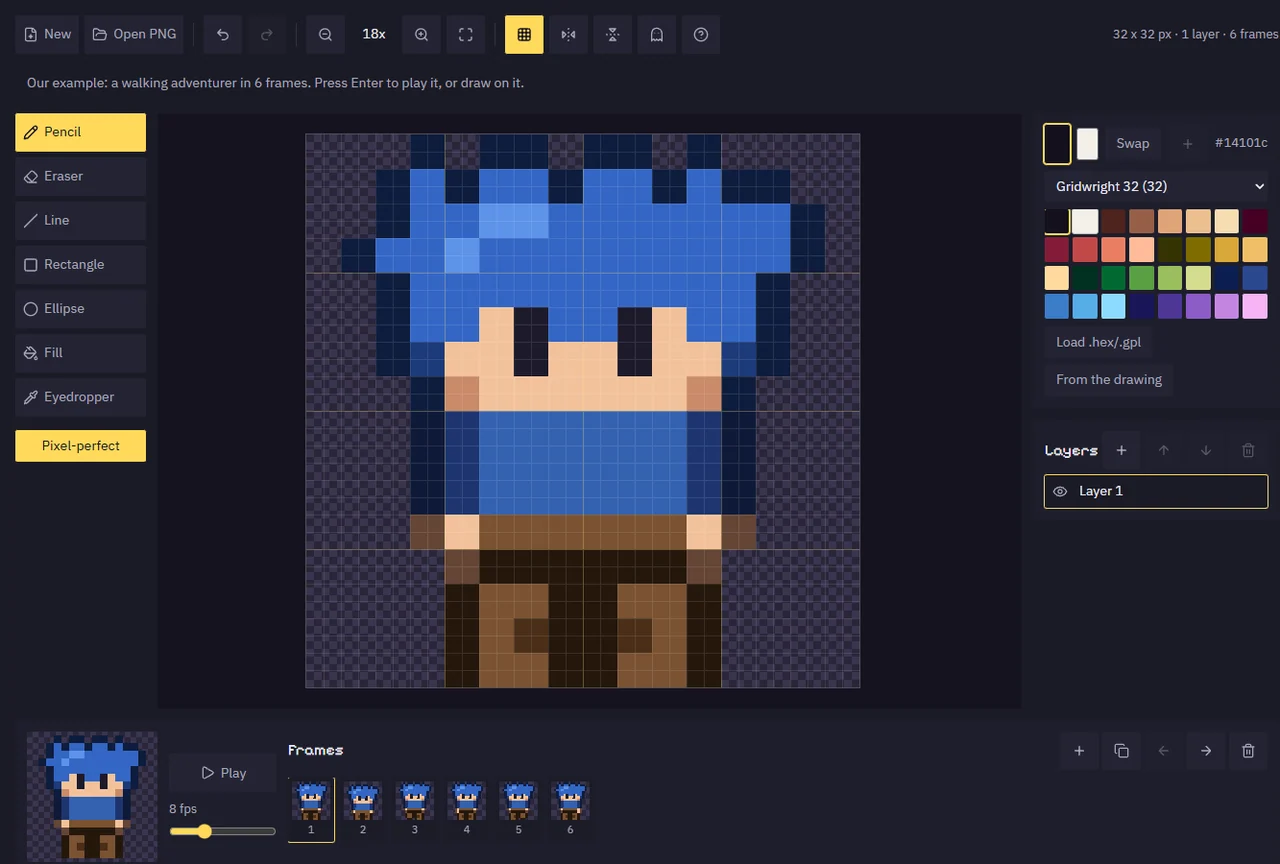
If you want an Aseprite alternative that opens in a browser tab, Gridwright's Pixel Art Editor draws and animates sprites with a mouse, with layers, frames and onion skin, and saves a PNG, a sprite sheet with a JSON atlas and a Godot SpriteFrames file, or a GIF. Aseprite is $19.99 for a desktop editor; Gridwright puts the editor, 30 more tools for every job around drawing, and 129 asset packs into one $17 monthly subscription.
This page shows what you get with each, why Gridwright is the better pick for getting a 2D game made, and what a year of each route costs. Aseprite's price, platforms and trial terms come from aseprite.org and its Steam page, read on 14 November 2026.
Aseprite alternative: the two side by side
| Aseprite | Gridwright | |
|---|---|---|
| Price | $19.99 once | $1 for 3 days, then $17 a month |
| Runs on | Desktop app for Windows, macOS and Linux | Your browser, nothing to install |
| Tools in the price | 1 | 31, plus 129 asset packs |
| Try first | A trial that can't save files | 3 days for $1 with every tool and up to 10 packs |
Every Gridwright asset pack, made to fit together, and all 31 tools for the fiddly work, with every new release, for $17 a month. Try it in your own game first: 3 days for $1, cancel any time.
Start for $1
What Aseprite is
Aseprite, made by Igara Studio, is a desktop editor for pixel art and sprite animation. Steam sells it for $19.99 for Windows, macOS and Linux, and its own site sells it too. The trial on its site has one stated limit: you cannot save files.
What Gridwright's Pixel Art Editor does
The Pixel Art Editor is built for drawing sprites, tiles and icons with a mouse: in pixel art you click pixels, so a mouse is all it takes. Canvases go from 8x8 to 256x256 pixels, the sizes game sprites, tiles and icons are drawn at. The tools are the ones pixel art needs:
- a pencil with pixel-perfect lines, and an eraser;
- lines, rectangles and ellipses, outlined or filled;
- a fill for a joined area or for every pixel of one colour;
- an eyedropper, mirror drawing for symmetric characters, and right click for a second colour;
- zoom, a grid and undo.
You pick colours from our palettes or load a .hex or .gpl file. You draw in layers and animate in frames, with onion skin showing the frames before and after and a preview that plays at the speed you set. You can open a PNG to edit it. When you are done you save the frame as a PNG at 1x to 8x, every frame as a sprite sheet with a JSON atlas and a Godot SpriteFrames file, or an animated GIF. The drawing is kept in your browser for next time, and nothing is uploaded.
How to draw and animate a sprite for Godot 4
- Start a canvas (32x32 is a good first size) or open a PNG.
- Pick a colour from the palette and draw; right click draws with the second colour, and mirror drawing keeps a character symmetric.
- Add a layer for details and a frame for each step of the animation, and turn on onion skin to see the frames around the one you are drawing.
- Play the preview at the speed you want, then save every frame as a sprite sheet with a JSON atlas and a Godot SpriteFrames file.
- In Godot 4, put the SpriteFrames on an AnimatedSprite2D and press play.
The tools around the editor
A sprite is only the start. Every job between drawing it and seeing it in your game has its own tool in the same subscription:
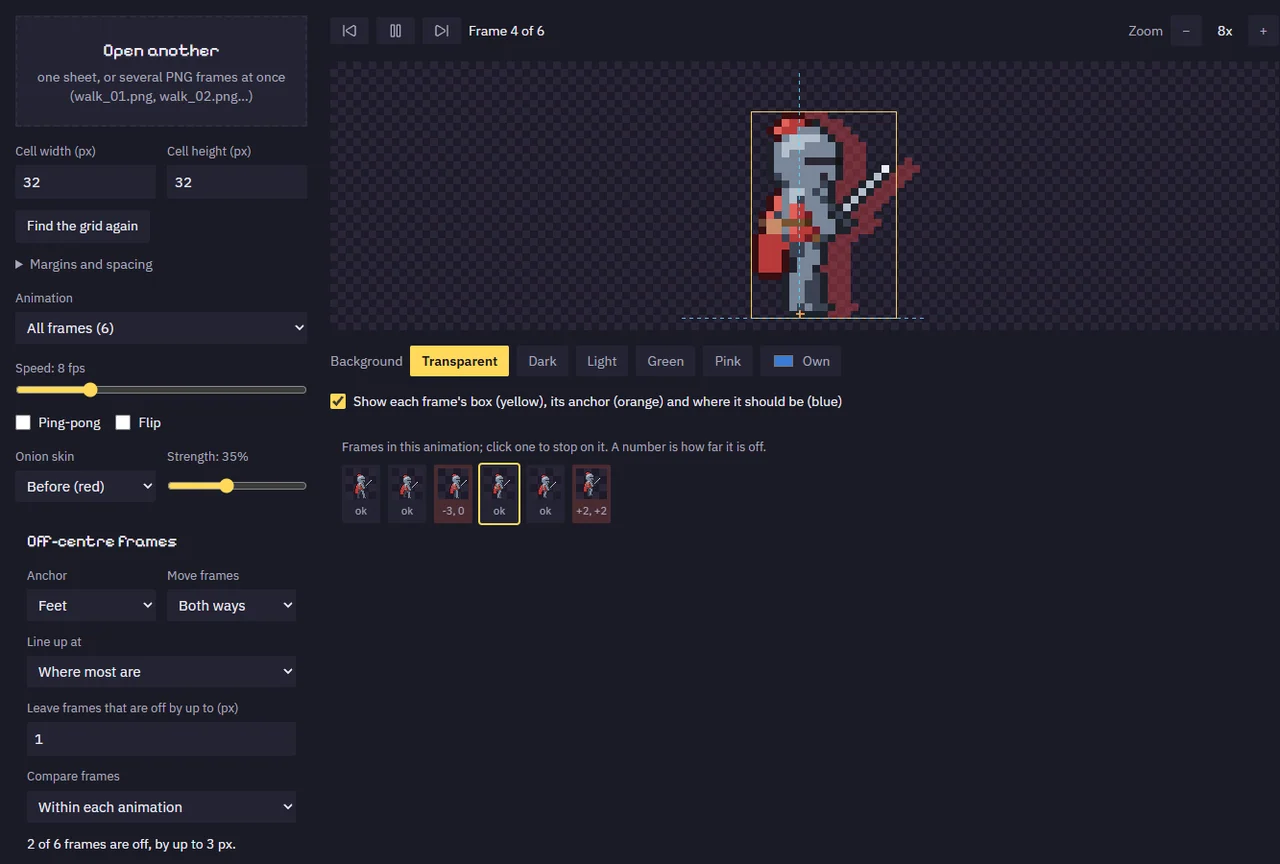
- Checking animation: the Sprite Animation Previewer plays a sheet with fps, ping-pong, flip and onion skin, marks frames drawn off-centre and lines them up.
- Building sheets: the Sprite Sheet Maker packs loose frames into a sheet with a JSON atlas and Godot SpriteFrames, and GIF to Sprite Sheet turns a GIF into one, keeping each frame's delay.
- Colour: the Palette Swapper makes team colours, the Pixel Palette & Shading Ramp Maker builds hue-shifted ramps, and the Color Palette Extractor pulls the palette out of any picture.
- Clean-up: the Sprite Outline Adder, the Pixel Art Background Remover and the Pixel Art Upscaler, which also scales Aseprite's JSON atlases with the picture.
- Characters without drawing them: the Hero Creator and Farmer Generator mix ready layers into new characters with every animation.
Pick the right size before you draw
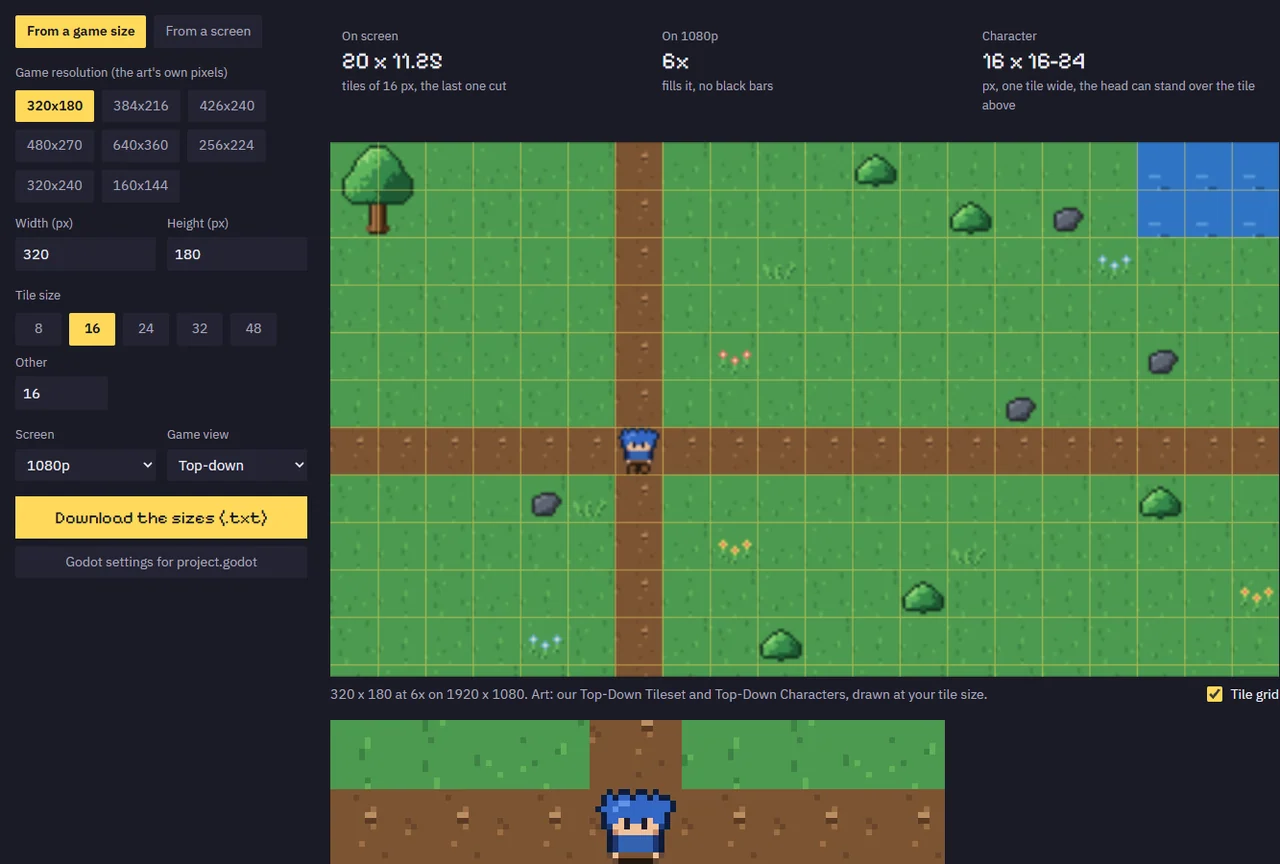
The first question of every pixel art game is what size the sprites, tiles and canvas should be, and the Pixel Art Size Calculator answers it before you draw a pixel. Pick a game resolution such as 320 x 180 or 640 x 360 and a tile size from 8 to 48 pixels, and it shows how many tiles fit on screen, how tall a character should be, and how big one art pixel is on a 720p, 1080p, 1440p or 4K screen. It scales by whole numbers only, shows the black bars each screen leaves, and writes the lines for Godot's project.godot and the values for Unity's Pixel Perfect Camera. The Godot Pixel-Perfect Setup then gives you the settings and a camera script that keep those sprites crisp and steady in Godot 4.
Why Gridwright is the better pick
- Draw in any browser. Open a tab on any computer and start drawing, with nothing to install, and your work is kept for next time.
- Straight into your engine. It saves every frame as a sprite sheet with a JSON atlas and a Godot SpriteFrames file, or as a GIF for your devlog.
- Every job around drawing. Previewing, packing, recolouring, outlining, cleaning up and scaling sprites each have their own tool, all in the same tab.
- Art you don't have to draw. 129 packs with 31,588 sprites, tiles and frames: tilesets, characters, UI, icons and effects. Draw the sprites that make your game yours, and take the rest from the library.
- Characters with every animation. The Hero Creator and Farmer Generator turn ready layers into new characters, already animated.
- Works with what you already have. The Gridwright tools open the PNG sheets you export from Aseprite, and the Pixel Art Upscaler reads Aseprite's JSON atlases.
- Every new release included. 136 packs and tools since 2 October 2026, about three a day, each one yours the day it comes out.
For how the other paid tools a 2D developer buys add up, see our guide to game dev tools on one subscription.
What a year costs
Aseprite is $19.99 for one job. The paid apps for the jobs Gridwright's tools do, plus a year of art, at each maker's list price:
| What you buy | Price |
|---|---|
| Aseprite, pixel art editor | $19.99 once |
| TexturePacker, sprite sheets | $49.99 once |
| SpriteIlluminator, normal maps | $49.99 once |
| Crocotile 3D, 3D from tiles | $29.99 once |
| Pixel FX Designer, particle effects (itch.io) | $14.96 once |
| Tilesetter, autotiles | $12.99 once |
| PixaTool, image to pixel art (list price) | $49.84 once |
| CraftPix monthly membership, art, 12 months | $180.00 |
| Bought separately, year one | $407.75 |
| Gridwright, year one | $1 for 3 days, then $204 for 12 months: $205 |
After two years the separate route comes to $587.75, even with no new update periods bought, against $409 for Gridwright. Bought one by one on our own store, every Gridwright pack and tool would cost $1,403.61.
FAQ
Is there a free Aseprite alternative in the browser?
Gridwright starts at $1 for the first 3 days, then $17 a month for all 31 tools and 129 packs. Every pack has its own page here with moving previews and screenshots, so you see it before you start.
Does Gridwright work with art I made in Aseprite?
Yes. Export a PNG or a sprite sheet from Aseprite and every Gridwright tool that opens pictures takes it, and the Pixel Art Upscaler also reads Aseprite's JSON atlases.
Can I animate in the Pixel Art Editor?
Yes. Add a frame for each step of the animation, turn on onion skin, and play the preview at the speed you set. Then save every frame as a sprite sheet with a JSON atlas and Godot SpriteFrames, or as a GIF.
What size can I draw in the browser editor?
From 8x8 up to 256x256 pixels, the sizes game sprites, tiles and icons are drawn at.
Can I sell games with sprites I drew in it?
Yes. The Gridwright licence lets you use what you make with the tools in personal and commercial projects. The packs are covered for free and commercial games too, as long as you don't resell or share the raw asset files, and some packs ask for a credit line in your game.
Every Gridwright asset pack, made to fit together, and all 31 tools for the fiddly work, with every new release, for $17 a month. Try it in your own game first: 3 days for $1, cancel any time.
Start for $1