 Gridwright
Start for $1
Pixel Cursors
Pixel art mouse cursors: 18 kinds in 6 styles, 16x16 + 32x32, hotspots in JSON, Windows .cur/.ani.
- What's inside
- 16x16 + 32x32, .CUR and .ANI
- Sizes
- 16x16, 32x32
- Formats
- PNG, JSON, CUR/ANI cursors
- Engine files
- Godot, Unity, GameMaker
- Download
- 830 KB
What it does for your game
- No more system arrow over your pixel art: The default white pointer stops breaking your game's look, and you stop drawing a hand, a crosshair and four resize arrows that all have to match.
- Picture your inventory screen: The steel and gold Fantasy arrow becomes an open hand over an item, a fist as you drag it, and a sword over an enemy.
- Hotspots already set: 18 kinds in 6 styles at 16x16 and 32x32, with every hotspot in cursors.json, Windows .cur and .ani files and a Godot 4 script that sets them all.
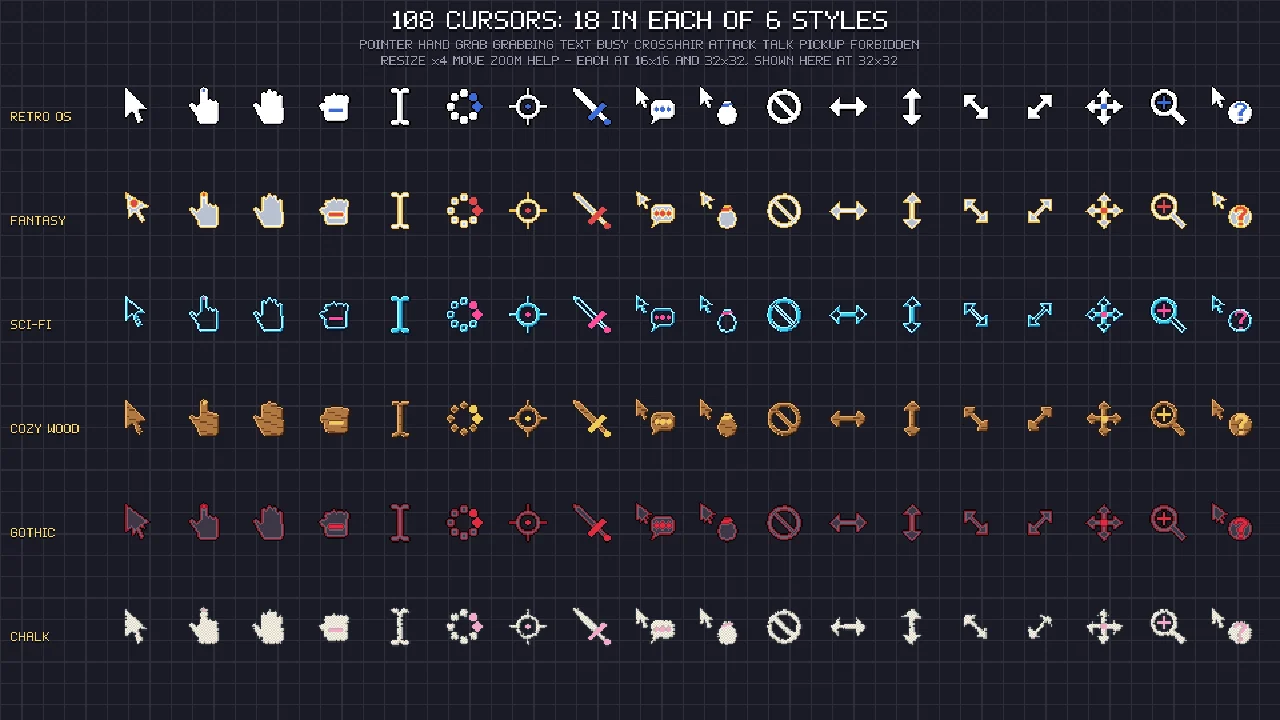
108 pixel art mouse cursors: 18 kinds in 6 styles, each drawn at 16x16 and 32x32, with the hotspot of every cursor in a JSON, an 8-frame busy animation, Windows .cur and .ani files and a Godot 4 script that sets them all. For RPGs, strategy and point-and-click games, menus, tools and your own desktop.
Licence in one line: use them in your commercial games; do not resell the files. No credit required.
The styles
- Retro OS: the classic white arrow and hand with a black outline.
- Fantasy: steel with a gold trim; a kite-shaped arrow with a red gem.
- Sci-Fi: hollow cyan outlines with pink accents.
- Cozy Wood: chunky and rounded, with wood grain and brass.
- Gothic: dark iron with crimson trim and a barbed arrow.
- Chalk: hand-drawn chalk on a slate outline, with rough edges.
The cursors (in every style)
pointer, hand (link), grab (open hand), grabbing (fist), text i-beam, busy (8 frames), crosshair, attack (sword), talk / interact, pick up, forbidden, resize left-right, resize up-down, resize diagonal (nw-se), resize diagonal (ne-sw), move, zoom, help.
Made to drop in
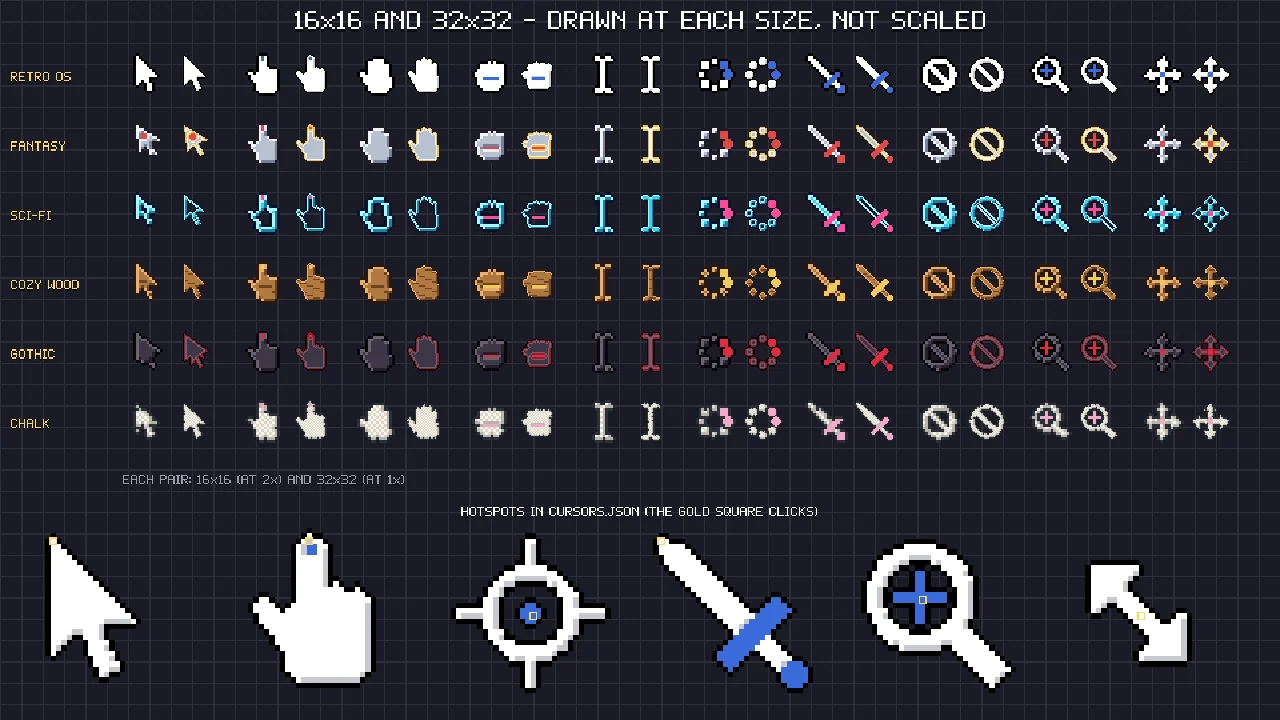
- Two sizes drawn on their own: 16x16 and 32x32, each also at 2x, so a cursor stays crisp at your game's resolution.
- Hotspots in cursors.json (and in a JSON beside each sheet), so the click lands on the tip of the arrow, the finger or the centre of the crosshair.
- Windows .cur and .ani: every cursor as a .cur with a 32x32 and a 64x64 image inside for high-DPI screens, and the busy cursor as an animated .ani; the README says where each goes in the Windows pointer scheme.
- Godot 4: an autoload script that maps every system shape (arrow, hand, I-beam, resize, move, forbidden, help, busy) to its cursor with the right hotspot, animates the busy cursor and has
use("attack")for game cursors. Unity and GameMaker steps are in the README. - Single PNGs and one strip per style and size, plus the palette (.hex, .gpl).
What it does not include
No macOS or Linux cursor theme files (the PNGs and hotspots work for those), no Aseprite files. Busy is the only animated cursor.
Every Gridwright asset pack, made to fit together, and all 31 tools for the fiddly work, with every new release, for $17 a month. Try it in your own game first: 3 days for $1, cancel any time.
Start for $1 Cozy UI
 Input Prompts
 Pixel UI Kit
 Strategy UI